

What Is RSS?
Monday 29th August 2005 - Sunday 4th September 2005
Categories: Guides, Internet
Introduction
Across the internet, there are thousands of websites. It is most likely that you don't read most of these websites, but you probably read quite a few. In the past, you would have to read each of these websites individually in order to check for updates, which can be laborious and slow. RSS solves this problem by providing the latest information from a website. Rather than providing the entire website, RSS provides summaries so that you can decide what content you want to read.
There is also an alternative to RSS called Atom, but this is essentially the same as RSS to the end user. As such, all the steps that are for RSS should also be applicable to Atom.
Now, this part is slightly more technical - if you don't care about the technical aspects of RSS, you can just skip ahead to the next part, 'How Can I Use RSS?'. Unfortunately, there are various version of RSS, and they are not all from the same group. Unlike formats such as (X)HTML and CSS, there is not a single group that creates the standards or specifications. Not only that, but there is also a similar format known as Atom that can also be used for feeds.
So, what types of feeds are there? Well, there are the various 0.9x RSS formats, not all of which are compatible with each other, which has been succeeded by RSS2. Netscape made RSS versions 0.90 and 0.91, while Userland made their own version of 0.91, as well as 0.92, 0.93, 0.94 and 2.0. Then there's RSS1.0, which was made by the RSS-DEV Working Group, and uses RDF syntax. To make matters worse, RSS stands for three different things: Rich Site Summary (RSS 0.91), RDF Site Summary (RSS 0.9 and 1.0) and Really Simple Syndication (RSS 2.0). Finally, there's the various Atom feeds.
How Can I Use RSS?
First of all, you need to find an RSS feed. RSS feeds are normally shown by buttons on web pages that state RSS or XML, often orange in colour. Feeds usually contain different items, each with a title, a link and a description. For example, on free-bees.co.uk, each item in the RSS feed is either a news update, or a new article. One item is the article on PNGs. The title is "The Problem With PNGs", the link is http://www.free-bees.co.uk/article.php?n=png, while the description is a short quote from the article.
If you just click on such a button that links to an RSS feed, you often are presented simply with an XML document. You need something that can read the document, and you generally have two main choices.
The first is to find a program designed specifically to read RSS feeds. One such program is straw. Below is a screenshot of Straw with the free-bees.co.uk RSS feed:
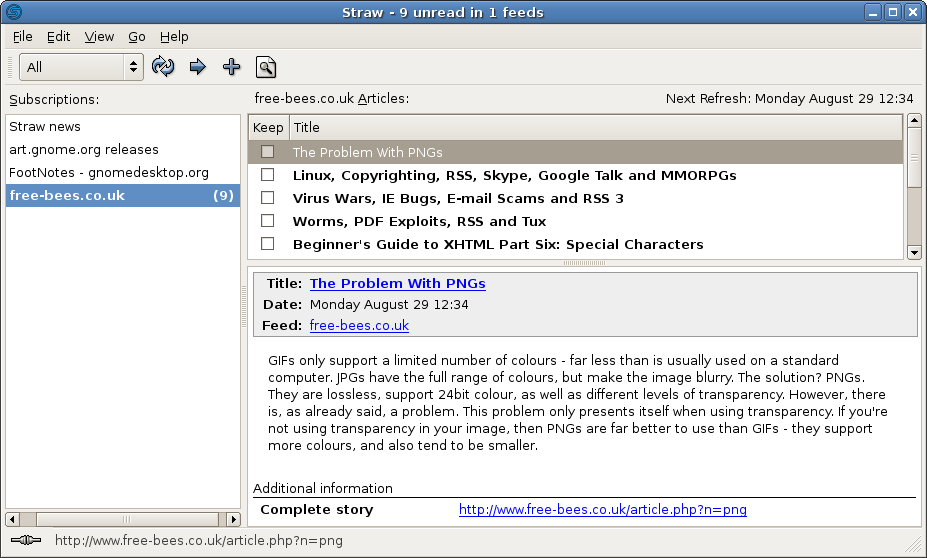
As you can see, each item from the feed is listed. When you click on each item, you get the description, as well as the link to the full story.
The other way to read RSS feeds to use web browsers with the feature built in.
Note: Since this article was written, an Atom 1.0 feed has been added to this site. To the end user, this is similar to an RSS feed, but, unlike RSS, is controlled by a standards body. As such, use of the Atom feed is prefered. However, the RSS feed is present since there is currently greater support for RSS.